Apple & Google just united (Major Search Update)
This week: Apple and Google are "Friends" now (and it changes local search); ChatGPT begins testing ads in free version; New Gemini "Side Panel" in Workspace triggers HIPAA alert
Apple and Google are "Friends" now (and it changes local search)
In a massive shift announced last week, Apple has officially teamed up with Google to integrate Gemini AI into Siri. For years, Siri and Google were competitors. Now, when an iPhone user asks Siri for "anxiety therapists near me" or "counseling open now," Siri will pull answers using Google’s AI and data, specifically your Google Business Profile (GBP).
This effectively unifies the search market. With Google powering Siri's answers, your GBP is now the source of truth for roughly 99% of smartphone users (Android + iOS). If your profile is optimized, you gain visibility across the entire Apple ecosystem without spending a dime. If it's missing data, Siri will route those potential clients to a competitor with a better profile.
👉 Action: Audit your Google Business Profile immediately with "Siri" in mind. Ensure your "Services" section is written in natural language (how people speak), not just keywords. Double-check your phone number and address, as this is the primary data Siri will read aloud to iPhone users.
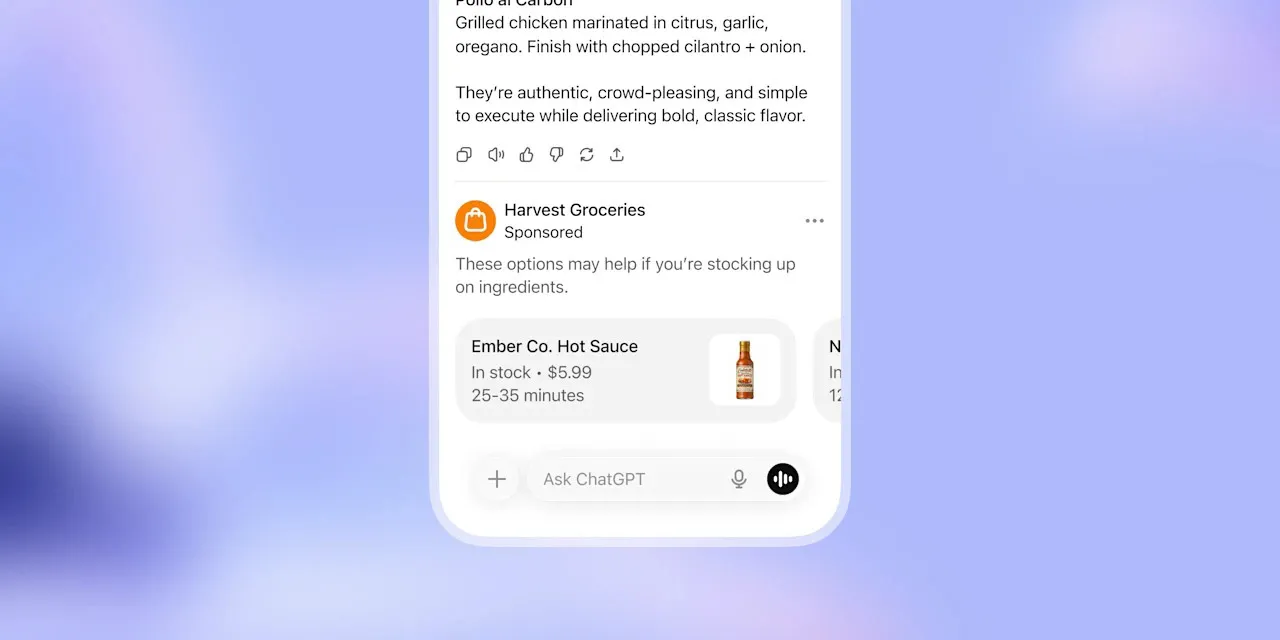
ChatGPT begins testing ads in free version
On January 17, OpenAI confirmed it is testing ads within the free version of ChatGPT. For therapists using the free tier for drafting emails, content ideas, or administrative tasks, this introduces two risks: distraction from commercial ads appearing in your workflow, and renewed concerns about data privacy, as ad-supported models typically rely on user data for targeting.
While OpenAI states ads will not influence answers, the introduction of commercial incentives into the chat interface changes the utility of the tool for professional use. More importantly, using a free, ad-supported AI tool with any practice data (even de-identified) carries higher privacy risks than paid, enterprise-grade workspaces.
👉 Action: Upgrade to ChatGPT Plus or Team to ensure an ad-free, private workspace. If you must use the free version, strictly prohibit entering any practice-specific data or patient scenarios, as ad-targeting algorithms may use your query patterns. Review your practice's "AI Acceptable Use" policy to specify that ad-supported tools are not approved for clinical workflows.

New Gemini "Side Panel" in Workspace triggers HIPAA alert
Google has begun rolling out the Gemini side panel directly inside Google Docs and Gmail for Workspace users. While convenient, this feature often appears automatically with prompts like "Help me write" or "Summarize this email." For therapists handling PHI (Patient Health Information) in Google Workspace, this creates an immediate compliance gray area.
Unless you have a specific BAA (Business Associate Agreement) that explicitly covers Generative AI features—which is separate from the standard Workspace BAA—inputting patient notes or email correspondence into the Gemini side panel may violate HIPAA. Standard BAAs often exclude "Additional Services" like experimental AI features.
👉 Action: Log into your Google Admin Console today. Go to Apps > Google Workspace > Gemini. Ensure the service is turned OFF for all users handling PHI unless you have verified your BAA covers it. Do not let staff use the "Help me write" button on patient intake forms or clinical notes until this is verified.

Google Business Profile creates "Social Proof" section
Google has quietly updated the layout of Business Profiles on mobile, moving "Social Profiles" to a prime position just below the map and contact info. Previously buried, links to your Instagram, LinkedIn, Facebook, and TikTok are now high-visibility trust signals.
This change suggests Google is using your social activity to verify your practice's legitimacy and activity level. An active social presence linked correctly to your GBP acts as a secondary verification method, proving to the algorithm that you are a real, operational business. Empty or missing links now look like a "ghost town" to potential clients browsing on mobile.
👉 Action: Go to "Edit Profile" on your Google Business Profile and select "Contact Information." Scroll down to "Social profiles." Add the specific URL for every professional account you have. Ensure the names match your practice name exactly. If you have an inactive Twitter/X account from 2021, do not link it; link only active channels.

FAQ pages become the #1 asset for AI Search
With the Apple/Gemini integration and the rise of "Zero Click" searches, the structure of your website content matters more than ever. AI models (like the one now powering Siri) prefer "Question and Answer" formats because they are easy to parse and read aloud.
Therapists who rely on vague "About Me" pages are losing visibility to practices that use specific FAQ structures. If a user asks, "Do you take Blue Cross?" or "How long are sessions?", the AI looks for a direct match. If your site doesn't have these questions explicitly written out, the AI will likely skip you.
👉 Action: Add a dedicated FAQ section to your homepage or "New Patients" page this week. Write 5-10 specific questions (e.g., "Do you offer evening appointments?"). Answer each in 2-3 concise sentences. This format is "AI candy" and significantly increases your chances of being the answer Siri reads aloud.
Quick wins for the week
- Audit your Google Workspace Admin settings to disable Gemini features until HIPAA compliance is verified
- Add your specific social media URLs to the "Social profiles" section of your Google Business Profile
- Upgrade free ChatGPT accounts to "Plus" to avoid the new ad-targeting algorithms
- Add 5 "Who, What, Where" FAQ questions to your homepage to capture Siri/Voice search traffic
- Check your Google Business Profile "Services" to ensure they are written in natural language, not just keywords
Final thoughts
This week, the line between "search engine" and "AI assistant" blurred completely. With Apple and Google joining forces, and ChatGPT introducing ads, the tools you use daily are changing their rules.
It creates a new kind of pressure: your Google Profile now powers Siri, your Google Docs now have AI buttons that might risk compliance, and your website needs to speak "robot" (FAQs) to get noticed. It's not just about ranking anymore; it's about being the verified, trusted answer across every platform.
While you're providing therapy, we're monitoring policy changes, protecting your Google presence, and optimizing for AI search. You shouldn't need to become an SEO expert, compliance specialist, and tech strategist on top of being a therapist.
Get the next edition in your inbox
One email a week on Google, AI search, and running a visible therapy practice. No fluff, unsubscribe anytime.