
Future Proof Your Practice
How to teach AI
about your services.
The Optimization pillar:
what you do, who you help and where.
Why optimization matters
Help people recognize the right fit.
A person is looking for help
They need to know whether your practice offers the kind of support they want.
- What you do and who you work with
- How and where appointments happen
Make those answers easy to find.
Your pages provide context
Clear pages and useful links help search systems understand the information you publish.
- Specific descriptions in readable text
- Accurate, connected practice details
Build on the search fundamentals you already use.
“Teach AI” means making your public information clearer. It does not guarantee a recommendation or train a model on demand.
Your presenter · Moonraker
I’m Scott Pope.
Helping therapy practices make sense of search, AI and growth.
At Moonraker, I work with the educators, consultants and partners who support therapists in private practice.
Turn what you know about your practice into clear, useful pages people can act on.

Practice example · Search Console clicks
Look at the evidence.
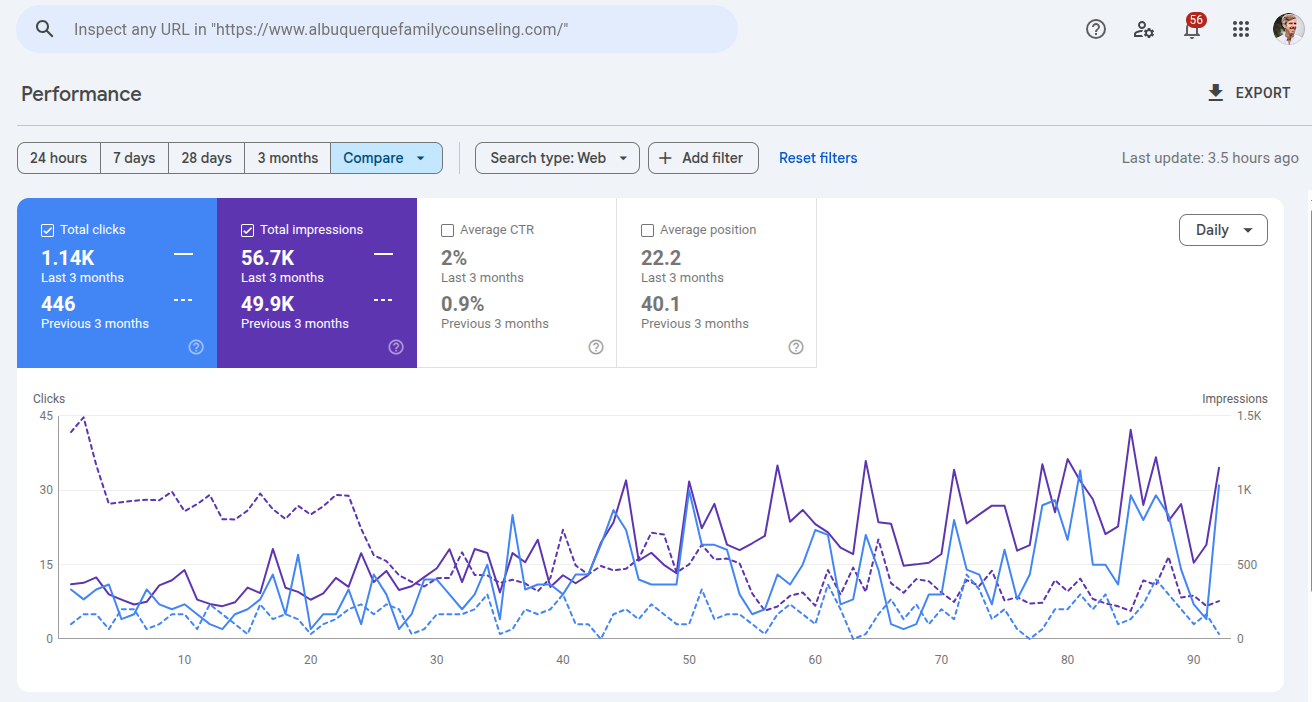
- Previous 3 months
- 446clicks
- Last 3 months
- 1.14Kclicks
Couples and family counseling practice. Exact comparison dates are not shown.
Practice example · Search Console clicks
EMDR, somatic therapy and intensives.
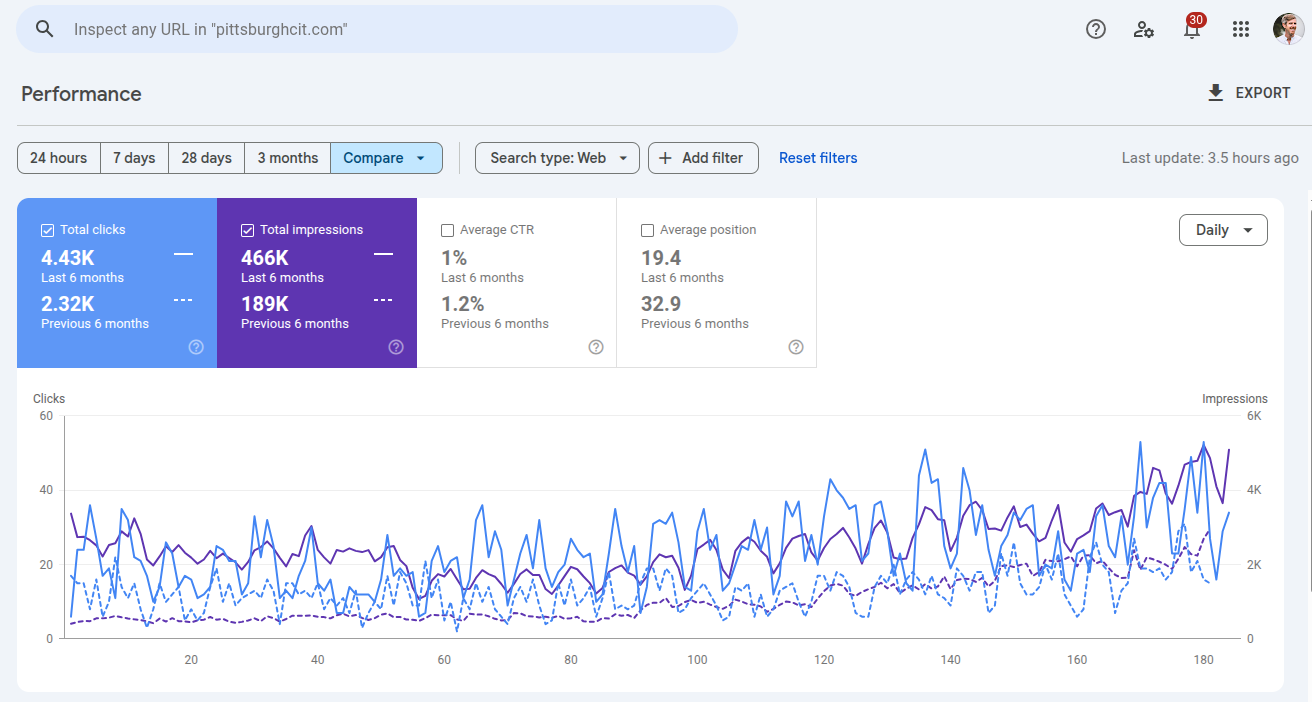
- Previous 6 months
- 2.32Kclicks
- Last 6 months
- 4.43Kclicks
EMDR, somatic therapy and multi-day intensives. Exact comparison dates are not shown.
Practice example · Search Console clicks
ADHD and autism assessments.
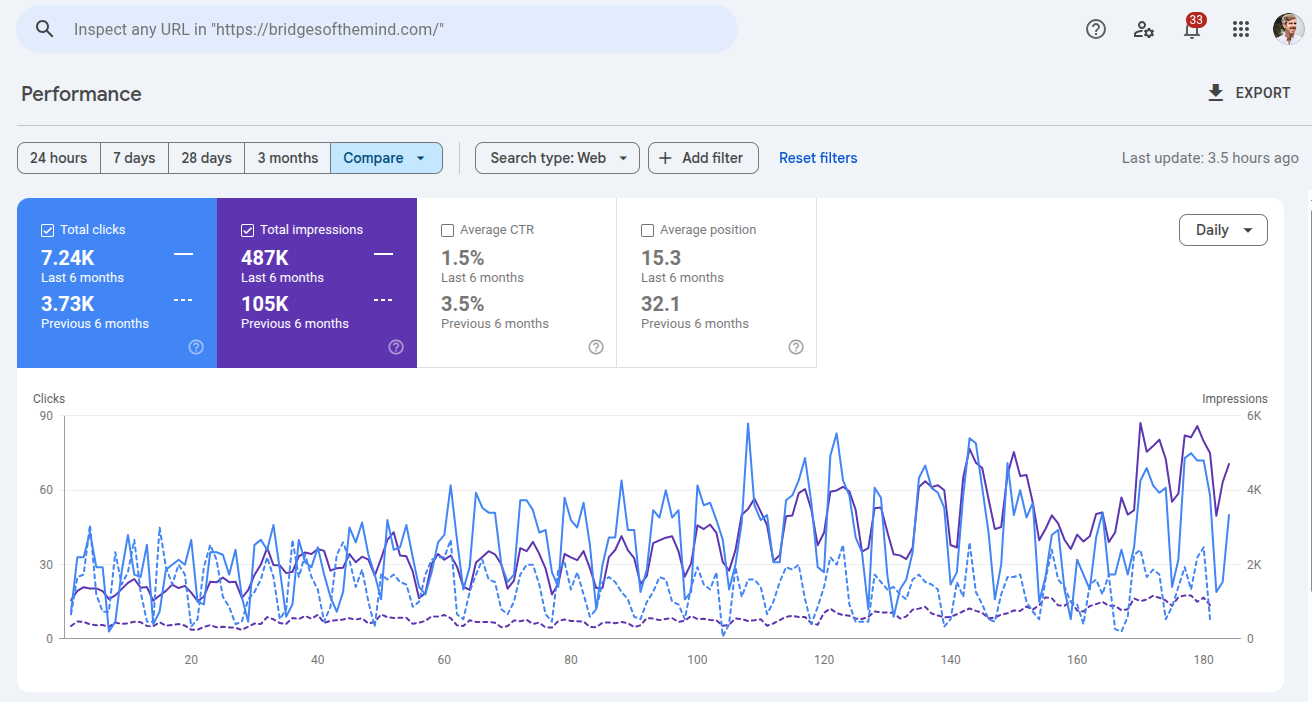
- Previous 6 months
- 3.73Kclicks
- Last 6 months
- 7.24Kclicks
Psychological assessments, including ADHD and autism testing. Exact comparison dates are not shown.
The CORE Marketing System™
Four pillars.
One clearer picture of your practice.
- C
Credibility
Do you exist, and are you qualified?
- O
Optimization
What do you treat, how, and where?
- R
Reputation
What supports your expertise?
- E
Engagement
How can someone connect with you?
02 · Optimization
Make what you do
unmistakable.
Explain your services in the language of the people looking for them.
Connect the help you offer with the people you serve and the places you can work.
Two sides of optimization
The service. The setting.
What you offer
Explain the problems you help with and the approaches you actually use.
- Specialties, modalities and additional services
- The people and populations you work with
Give each important offering enough useful detail.
Where it happens
Explain where clients can receive those services.
- Your actual offices and service areas
- In-person appointments, telehealth or both
Connect each service to the right location and clinician.
What you do · Dedicated pages
Give each core service a clear home.
Specialties
Describe the issues your practice regularly helps people work through.
- Trauma therapy, anxiety therapy or OCD treatment
- A clear page name and descriptive URL
Example: Trauma therapy · /trauma-therapy
Additional services
Explain offerings that have a distinct process or purpose.
- ADHD evaluations or autism assessments
- Medication management, if your practice offers it
Example: Autism assessments · /autism-assessments
Build a page when you have something useful and distinct to say. Avoid thin pages that only swap a keyword or city.
How you help · Treatment approaches
Show how you approach the work.
Name the approach
Use the full name and familiar abbreviation of the methods you actually practice.
- Eye Movement Desensitization and Reprocessing (EMDR)
- Cognitive behavioral therapy (CBT)
Explain the approach in your own plain language.
Make the experience concrete
Describe how you use that method with the people you serve.
- The clinician’s actual training and approach
- Weekly sessions, groups or intensives, if offered
Keep clinical explanations accurate and practice-specific.
What to expect
Make the next step less unknown.
Help someone picture the process before they contact you.
- Start
The first conversation
Explain intake, fit and what a new client can expect at the beginning.
- Work
Ongoing sessions
Describe the format, typical length and how you decide on frequency.
- Plan
What happens next
Explain how you review goals and discuss options as the work develops.
Describe your process without promising a particular result or a fixed timeline for everyone.
Who you help · Fit and scope
Let people see who the page is for.
Name the people you serve
Be specific about the ages, relationships and communities your practice is equipped to support.
- Adults, teens, couples or families
- Relevant community experience and cultural context
Connect population pages to relevant services and approaches.
Explain the fit
Describe common concerns in words a prospective client would recognize.
- For example: teens dealing with anxiety at school
- Explain service limits and referral options when relevant
State your actual scope respectfully and accurately.
Where you work · In-person visits
Give each real place useful detail.
Help someone get there
Treat an office page as a useful introduction to that location.
- Address, neighborhood, map and contact information
- Arrival, parking and accessibility details
Use an accurate map or eligible Business Profile link.
Explain what happens there
Show the services and people available at that office.
- Relevant service and modality pages
- The clinicians who actually practice there
Link to their bios and public credential information.
A location page should describe a real place you use. A list of nearby cities is not a substitute.
Where you work · Telehealth
Be precise about online care.
Say where it is available
List the jurisdictions where your clinicians are authorized to provide the advertised service.
- Distinguish telehealth coverage from office locations
- Identify which clinician serves which area
Have your practice confirm eligibility before publishing.
Explain how to get started
Describe booking, appointment format and the practical setup clients need.
- A clear online-therapy page can cover several states
- Keep links, service details and availability current
Create separate pages only when they add useful local detail.
A simple service page
Build around their questions.
- 01
Name theservice.
Say what it is and who it is for.
- 02
Explain theapproach.
Describe what happens and who provides it.
- 03
Answer realquestions.
Cover the details people need before booking.
- 04
Offer a clearnext step.
Explain where it happens and how to get started.
Who it is for · What it involves
Your clinician · Where sessions happen
Your general FAQ page
Answer the practical questions, too.
Before someone books
Explain the everyday decisions involved in starting with your practice.
- Fees, insurance, superbills and payment options
- Scheduling, waitlists and cancellation policies
Check these answers whenever your policies change.
Before someone arrives
Help visitors understand what their first appointment involves.
- Intake, session length and appointment format
- Telehealth setup, parking and accessibility
Keep service-specific clinical questions on the relevant page.
Choose questions people really ask. There is no required FAQ count for AI visibility.
Optimization · Structured data
Connect the facts
behind the page.
Schema gives published information a consistent, machine-readable structure.
It describes your claims. It does not independently verify them or guarantee an AI recommendation.
Schema · A simple relationship map
Three things. Clear connections.
- Organization
The practice
Name, website and official profiles.
01 ↗Connect to the practiceLocalBusiness when it accurately describes the business.
- Person
The clinician
Name, professional background and public links.
02 ↗Connect to the clinicianKeep credentials consistent with the visible bio.
- Service
The offering
Service name, provider and area served.
03 ↗Connect to the service pageUse the singular type Service, with relevant properties.
Ask your web team to use consistent identifiers so the same practice and people connect across pages.
Schema · Context matters
Match the markup to the page.
Describe what is there
Use WebSite and WebPage for site and page context, alongside the relevant entities.
- LocalBusiness for an appropriate real business location
- Person or ProfilePage for an appropriate clinician bio
Choose MedicalBusiness only when its definition fits.
Keep FAQs useful
FAQPage remains a schema.org type for a page with questions and answers.
- Match the questions and answers people can read
- Google retired FAQ rich results in May 2026
FAQ markup is not a special requirement for Google’s AI features.
Schema · A practical workflow
Draft it. Check it. Keep it current.
Your web team can use AI to help prepare a draft from approved page content.
- Draft
Start with real facts
Use the actual page, confirmed business details and existing site identifiers.
- Check
Validate both parts
Check schema.org vocabulary, then eligible Google features with the Rich Results Test.
- Keep
Review the live page
Confirm the markup matches visible content and update both when facts change.
A validator checks structure. It does not confirm that a claim is true or that a search feature will appear.
Takeaway tool · Schema prompt
Give the draft accurate inputs.
Supply the page and facts
Provide the approved copy, page URL and the practice’s existing markup.
- Only relevant, confirmed business and clinician details
- Known identifiers, profile links and service locations
Let the page determine which types and properties apply.
Require a reviewable result
Ask for a draft plus any questions or missing facts.
- No invented license numbers, addresses or ratings
- No claim of validation unless a tool actually ran
Have your web team review it before publishing.
Read the complete prompt
MOONRAKER: SCHEMA DRAFTING PROMPT
Future Proof Your Practice, Part 3
Updated 16 September 2026

Use this prompt with your web team. Replace the brief with confirmed, public
practice information. Review the draft before adding it to a website.

PROMPT

Prepare appropriate JSON-LD structured data for this page.

Approved visible page copy: [paste]
Canonical page URL: [supply]
Practice name and website: [supply]
Relevant clinicians, qualifications and public verification links: [supply]
Services and confirmed service areas: [supply]
Actual office/contact details, if relevant to this page: [supply]
Existing site markup and entity @id values: [paste or say unknown]
Other confirmed public facts: [supply]

Requirements
- Read the page and choose appropriate schema.org types. Explain the choice.
- Use https://schema.org as @context and reuse existing entity identifiers.
- Include only facts represented accurately on the visible page.
- Use properties appropriate to each type. A Person or Service does not need
  every LocalBusiness property. Do not force an address or coordinates where
  they do not belong.
- Do not invent addresses, license numbers, NPI numbers, prices, hours,
  coordinates, ratings, profile URLs or clinical qualifications.
- If a needed fact is missing, ask or list it outside the draft. Omit
  unresolved values from the proposed JSON-LD.
- Do not automatically add rating or review markup.
- FAQPage is optional and must describe visible questions and answers.
  Do not promise Google FAQ rich results; that feature was retired in May 2026.
- Output a JSON-LD draft wrapped in a script tag with type application/ld+json,
  plus open questions and validation instructions. Do not modify or publish a site.
- Report validation honestly: name the actual tool and findings if you ran it;
  otherwise say "not yet validated". A model's review is not a validator run.

HUMAN REVIEW

Confirm the facts and relevance of the chosen types. Check for duplicate or
conflicting entity records. Validate vocabulary with https://validator.schema.org/
and check supported Google features with https://search.google.com/test/rich-results.
After implementation, inspect the served page and its visible information.
Update both the markup and the page when the practice changes.

Structured data describes information. It does not independently verify a
credential, guarantee a rich result or ensure a recommendation by an AI system.

REFERENCES
https://developers.google.com/search/docs/appearance/structured-data/sd-policies
https://developers.google.com/search/docs/fundamentals/ai-optimization-guide
https://developers.google.com/search/updates#may-2026
Page content · Clear and specific
Use the words people understand.
Answer the actual question
Explain the service, who it is for and what the experience involves.
- Use clear headings and direct answers
- Explain clinical terms when they are useful
“Help with anxiety” can sit alongside a precise clinical term.
Add your practice’s detail
Use the information someone cannot learn from a generic description.
- Your approach, clinicians and available formats
- Relevant FAQs and links to the next useful page
Have a clinician review clinical statements and service scope.
Natural language is an editorial choice for clarity, not a proven ranking advantage for a particular phrase.
Takeaway tool · Page builder
Start with one important page.
Use the reusable instructions and page brief to prepare a draft you can review.
- Facts
Set the context
Add approved practice details, professional information and a voice sample.
- Page
Choose the purpose
Pick a page type, audience, service, location and useful internal links.
- Review
Check every claim
Confirm accuracy, clinical scope, tone, links and any proposed markup.
The complete instructions and page brief are included below in Read, and available as a text download.
Read the complete prompt
MOONRAKER: PRACTICE PAGE BUILDER
Future Proof Your Practice, Part 3
Updated 16 September 2026

Use Section A as reusable instructions in your preferred writing tool. Supply
the practice facts once, then use Section B for each page. This produces a
draft for review. It does not publish a page or guarantee search visibility.

SECTION A: REUSABLE INSTRUCTIONS

Role and purpose
Help a therapy practice write accurate, useful website copy using the
Optimization pillar of Moonraker's CORE framework. Each page should explain
what the practice offers, who it serves, how the service works and where it
is available. Write for someone deciding whether to contact the practice.

Practice facts to request
- Practice name, website URL and professional contact details.
- Actual office locations, arrival details and accessibility information.
- Telehealth jurisdictions and the clinicians authorized to serve each one.
- Services, specialties, approaches, populations and appointment formats.
- Current fees, insurance, payment options, scheduling and practice policies.
- Relevant public Business Profile, directory and professional profile links.
- Existing pages and the site's existing structured-data identifiers.

Clinician facts to request when relevant
- Name, role, professional credentials and public verification links.
- License jurisdiction and current scope, confirmed by the practice.
- NPI if applicable, education, specialist training and actual certification.
- Modalities, experience, public contributions and practice affiliation.
- Keep training, certification, membership and licensure distinct.

Voice
- Ask for a short sample of approved copy and any brand preferences.
- Write warmly, directly and specifically. Explain necessary clinical terms.
- Use sentence case, a clear heading hierarchy and descriptive links.
- Avoid generic promises, keyword stuffing and artificial word-count targets.
- Follow the practice's punctuation and formatting preferences. Preserve
  approved wording wherever the practice asks you to keep it.

Page-type playbook

Homepage
Introduce the practice, people served, core specialties, approaches and
locations. Give each main offering a brief explanation and a useful link.
Show how someone can get started. Choose headings for the actual hierarchy;
there is no requirement that every offering be an H3.

Specialty
Focus on a presenting concern, such as anxiety or trauma. Explain who the
service is for, the approach, who provides it, where it is offered and what
to expect. Use a descriptive title and URL, such as /trauma-therapy.

Modality
Use the full method name and common abbreviation on first use. Explain how
the practice uses it, the clinician's actual training, the session experience
and relevant formats. Link to the concerns and populations it serves. Do not
describe all approaches as equally evidence-based or promise a clinical result.

Additional service
Explain the purpose and process of a distinct offering, such as an assessment.
Cover suitability, provider, format, location and what the practice can confirm
about the experience. Do not invent clinical criteria or assessment outcomes.

Population
Describe the people the page is for and the concerns they bring. Include only
community experience and cultural competence the practice can substantiate.
Connect to relevant specialty and modality pages, and describe scope
respectfully. Do not manufacture a separate page when existing content is enough.

Location
Describe a real office: contact and arrival information, accessibility,
available services and the clinicians working there. Link to relevant pages.
Do not imply an office exists in every city a practice serves. Distinguish
telehealth coverage and have the practice confirm jurisdictional eligibility.

Bio
Introduce the clinician, approach, populations and service locations. Include
accurate professional history and useful public verification links. A generic
institution or association homepage does not verify an individual's record.

General FAQ
Cover actual practice questions about intake, booking, availability, fees,
insurance, payment, policies, appointment format and arrival. Use the practice's
approved confidentiality and urgent-help information if supplied. Ask when it
is missing. Keep service-specific clinical questions on the relevant pages.
Use as many useful questions as the facts support, without a fixed quota.

Accuracy and privacy
- Ask about missing facts in small groups. Mark unknowns for review rather
  than inventing answers, addresses, coordinates, availability or credentials.
- Use approved public practice information. Do not request or include patient
  records, identifiable client stories or private clinical information.
- Do not add patient testimonials, client names or review quotes to these drafts.
  This is a content rule for this workflow, not a legal compliance certification.
- Do not promise outcomes, Google rankings or recommendations from an AI system.
- Require a qualified practice reviewer to approve clinical and scope claims.

Structured data
If requested, propose relevant JSON-LD separately from the page copy. Start
with the supplied page and existing site markup. Reuse consistent entity @id
values; avoid creating conflicting versions of the practice or clinicians.
- Organization: practice identity; LocalBusiness where the business fits.
- Person: clinician details; ProfilePage for an appropriate profile page.
- Service: the offering, provider and relevant service area.
- WebSite and WebPage: site and page context where appropriate.
- FAQPage: optional description of visible questions and answers. Google
  retired FAQ rich results in May 2026. Do not promise them or claim FAQ
  markup is necessary for Google's generative AI features.
Choose properties according to the type and actual facts. Do not force a
physical address, opening hours or coordinates onto every entity. Do not add
Review or AggregateRating automatically, or copy ratings from other websites.
Use https://schema.org as @context. Flag unresolved facts outside the JSON-LD;
do not put invented values or placeholder credentials into publishable markup.
Check vocabulary with the Schema.org Validator and supported Google features
with the Rich Results Test. Report whether a tool actually ran. Valid syntax
does not verify facts, clinical qualifications or eligibility for a result.

Output
1. Open questions and facts requiring confirmation.
2. A proposed title, meta description and descriptive URL slug.
3. H1 and complete page copy with a useful H2/H3 hierarchy.
4. Relevant FAQs with accurate answers from the supplied information.
5. Internal linking notes using existing pages or clearly marked proposals.
6. If requested, a separate JSON-LD draft and validation status.
7. A short review list covering facts, clinical scope, privacy, tone and links.
Write copy only. Do not generate a design, CSS or layout HTML. A requested
JSON-LD script block is the sole code exception. Do not publish anything.

SECTION B: PAGE BRIEF

Build a draft using the reusable instructions above.

Page type: [homepage / specialty / modality / additional service / population /
location / bio / general FAQ]
Specific topic:
Target URL:
Audience and populations:
Services or approaches to explain:
Clinicians who provide them:
Actual locations and confirmed telehealth coverage:
Appointment formats and practice-specific details:
Service limits or referral information, if relevant:
Existing approved copy and voice sample:
Other pages to link to:
Known public sources or verification links:
Existing structured data and entity identifiers:
Is a JSON-LD draft requested? [yes / no]
Special requirements and facts requiring confirmation:

When I type "go", ask for the most important missing information in manageable
groups. After the brief is complete, produce the draft and review list. Keep
uncertainties explicit. Reuse the practice context for the next page while
checking any facts that differ by service, clinician or location.

REFERENCE NOTES
Google AI guidance: https://developers.google.com/search/docs/fundamentals/ai-optimization-guide
Structured data: https://developers.google.com/search/docs/appearance/structured-data/sd-policies
FAQ update: https://developers.google.com/search/updates#may-2026
Schema.org: https://schema.org/
Schema validator: https://validator.schema.org/
Google Rich Results Test: https://search.google.com/test/rich-results
Review markup: https://developers.google.com/search/docs/appearance/structured-data/review-snippet
Google Business Profile · Eligible practices
Make your Business Profile accurate.
Choose the right category
Choose a specific available category that describes your core business.
- Use as few categories as needed
- Do not use categories as a list of keywords
A specialty does not automatically need another category.
List the services you offer
Use the Services editor where it is available on your profile.
- Add accurate names and helpful descriptions
- Keep services consistent with your website
Follow Google’s eligibility and representation rules.
Google Business Profile · Ongoing care
Keep the public details current.
Write a useful description
Explain your practice, services and location in a natural voice.
- Stay within the 750-character limit
- Leave out links, promotional offers and keyword lists
You do not need to fill every character.
Check what people can find
Review your contact details, hours and website links when the practice changes.
- Keep common questions answered on your own website
- Check which features are available on your actual profile
Do not rely on a particular Q&A interface staying available.
Your homepage · A useful starting point
Bring the whole practice together.
- 01
Introduce yourpractice.
Say who you help and the support you offer.
- 02
Connect yourservices.
Link to specialties, modalities and related pages.
- 03
Make yourlocations clear.
Show office and telehealth options accurately.
- 04
Explain how tobegin.
Give visitors a clear route to contact you.
Your people.
Specialties · Approaches · Populations
Clinicians · Offices · Telehealth
Review the homepage regularly, for example every six months, and whenever your practice changes.
Your optimization checklist · Services
Check the help you describe.
Start with the services that matter most to your practice.
- 01
Specialties
Make the offering clear.
Give each core service useful detail and a descriptive page name.
- 02
Modalities
Explain the approach.
Use the full name and abbreviation, with an accurate account of your process.
- 03
Populations
Name who it is for.
Explain the ages, relationships or communities you are equipped to serve.
- 04
Experience
Answer what comes next.
Cover format, expectations and a clear route to getting started.
Your optimization checklist · Places
Check where the work happens.
Connect the right services and people to the right places.
- 01
Offices
Check the real details.
Review addresses, maps, arrival information and the services available there.
- 02
Telehealth
Confirm the coverage.
Check the advertised jurisdictions and which clinicians can serve them.
- 03
Business Profile
Keep it accurate.
Review eligibility, categories, services, description and contact details.
- 04
Connections
Follow the links.
Make it easy to move between locations, relevant services and clinician bios.
Your optimization checklist · Page quality
Check the complete experience.
Review the useful details as well as the technical work.
- 01
FAQs
Answer real questions.
Separate practice logistics from service-specific questions and keep both current.
- 02
Structure
Make the page readable.
Use clear headings, descriptive links and important information in visible text.
- 03
Schema
Match the published facts.
Review relevant types, existing identifiers and validation with your web team.
- 04
Upkeep
Keep improving.
Review the live page on desktop and phone, then update it as your practice changes.
Your next step
Let’s talk about
your practice.
Bring your questions to a free strategy call.