
Moonraker Practice Guides
The ultimate guide to
website optimization.
From site structure to the next inquiry.
A practical, detailed guide for therapy practices.
Website optimization
Start where your practice is today.
Building or rebuilding
Plan the information before choosing page layouts.
- List your actual services and audiences.
- Identify your offices and telehealth coverage.
Improving an existing site
Look for the weakest part of the path to an inquiry.
- Review useful search traffic and inquiry quality.
- Prioritize a specific gap before expanding.
Use this guide as a working reference. You do not need to change everything at once.
Your presenter · Moonraker
I’m Chris Morin.
Helping therapists build practices that make a positive difference.
My background in massage therapy and digital marketing led me to start Moonraker in 2019.
Turn a collection of pages into a clear, connected practice website.

Your website, end to end
Plan. Build. Connect.
Give each improvement a clear purpose.
- 01 · PLAN
Structure and language
Map services, locations and visitor questions. Research how people describe the help they want.
- 02 · BUILD
Useful individual pages
Improve titles, headings, images, mobile layouts and the contact path.
- 03 · CONNECT
An accurate public presence
Align website details, eligible profiles, structured data and professional mentions.
Review the results after each meaningful change.
Website optimization
Improve deliberately.
Record your starting point
Save what is working before making structural changes.
- Record important URLs, queries and inquiries.
- Keep a backup and an old-to-new URL map.
Match the change to the problem
An unclear button needs a different fix from missing services.
- Test small copy and layout changes first.
- Plan redirects before moving established pages.
No tactic is risk-free. A site that already performs well may need a focused improvement, not a rebuild.
01 · Plan
A clear structure.
A useful starting point.
Organize around the help you offer and the people looking for it.
Map the site before writing every page.
Website optimization
What you treat. How. Where.
Give each page a job
Separate substantial topics when they answer different visitor needs.
- Services and specialties explain the help.
- Team, fees and FAQs answer practical questions.
Make the relationships clear
Connect relevant pages through normal, descriptive links.
- Show which clinicians offer each service.
- Link to the places or states where it is available.
A simple planning diagram helps you spot gaps and duplication before you build.
See it in practice
See the whole site at once.
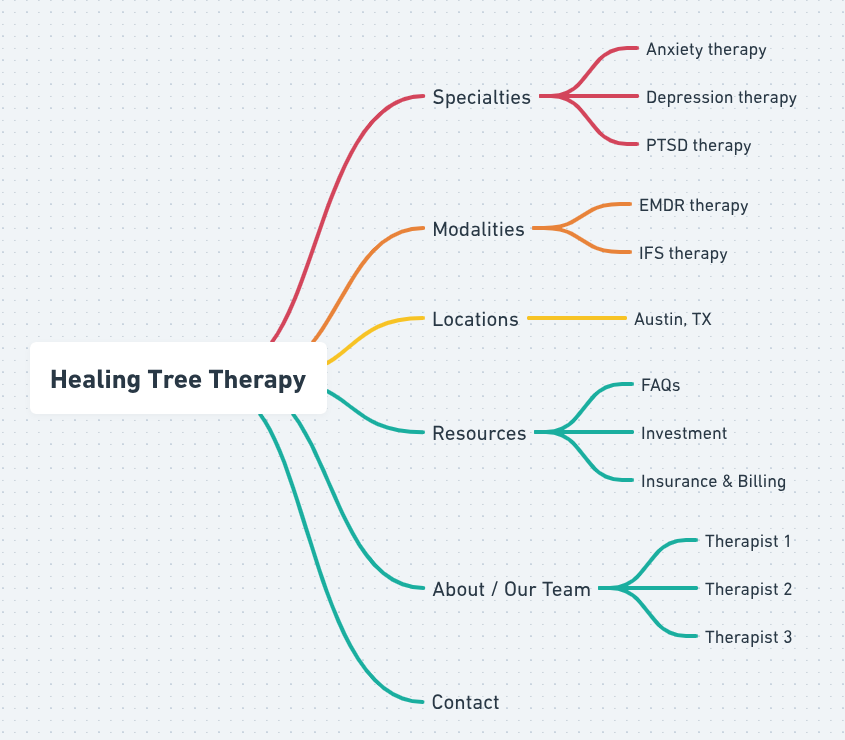
Start with the services you offer and the people you help. Give every page a clear purpose.
Website optimization
Choose language people recognize.
Compare related terms
Use Google Trends to explore relative interest over a chosen period and region.
- Compare the same search type and geography.
- A low result can mean too little data.
Check the intent
A popular phrase may not describe the service someone wants.
- Compare service searches with general information.
- Use Search Console to see queries reaching your site.
Trends reports relative interest, not monthly search volume. Relevance to your service comes first.
See it in practice
Read the comparison in context.
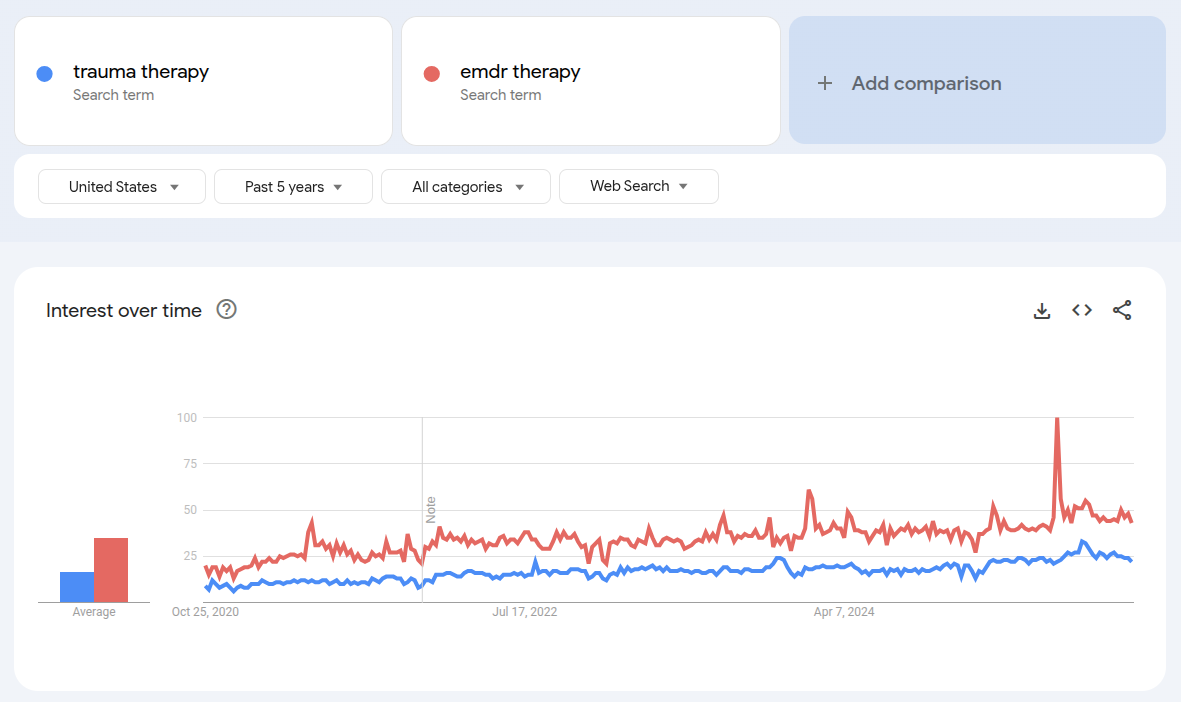
This is a historical U.S. comparison. Check current interest for your own area and dates.
Website optimization
Give every page a clear identity.
Title and navigation
Use a descriptive search title and a concise navigation label.
- Example title: Trauma Therapy in Austin | Practice Name
- Example menu label: Trauma therapy
URL and description
Use a readable URL and a helpful preview of the page.
- A stable URL might be /trauma-therapy.
- Describe the service, audience and useful next step.
These fields serve different purposes. Google may generate a different title or snippet.
See it in practice
Give each field a purpose.
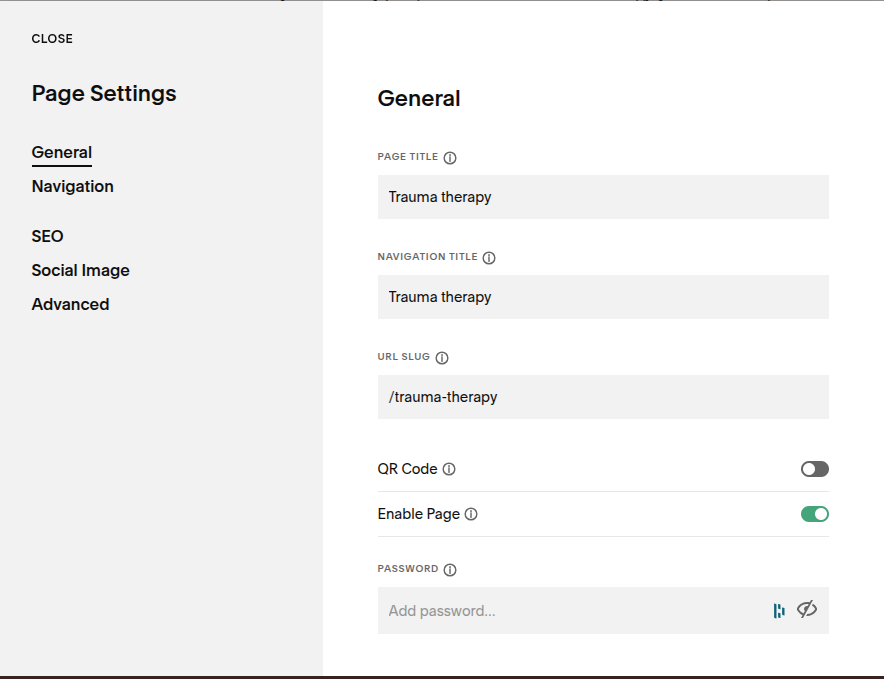
Check these fields and your SEO settings separately. Your editor may look different.
Website optimization
Keep old links useful.
Before changing a URL
Save the current address and choose its closest relevant replacement.
- Avoid moving a page for cosmetic reasons alone.
- Map each old URL to the right new page.
After the move
Use a permanent redirect when the move is permanent.
- Update internal links and your sitemap.
- Test old links and monitor indexing and traffic.
Redirects help connect old and new addresses. They are not a promise that rankings will stay unchanged.
Help visitors decide to keep reading
Make the first screen useful.
- 01
Recognize theirgoal.
Be empathetic and specific. Avoid promises about clinical outcomes.
- 02
Explain theservice.
Say what you offer, for whom and where.
- 03
Offer a clearnext step.
Explain what happens after someone contacts you.
- 04
Show relevantcredentials.
Use accurate qualifications and experience.
your next chapter.
Trauma therapy for adults in Austin.
With a licensed, experienced therapist.
See it in practice
Four elements, working together.
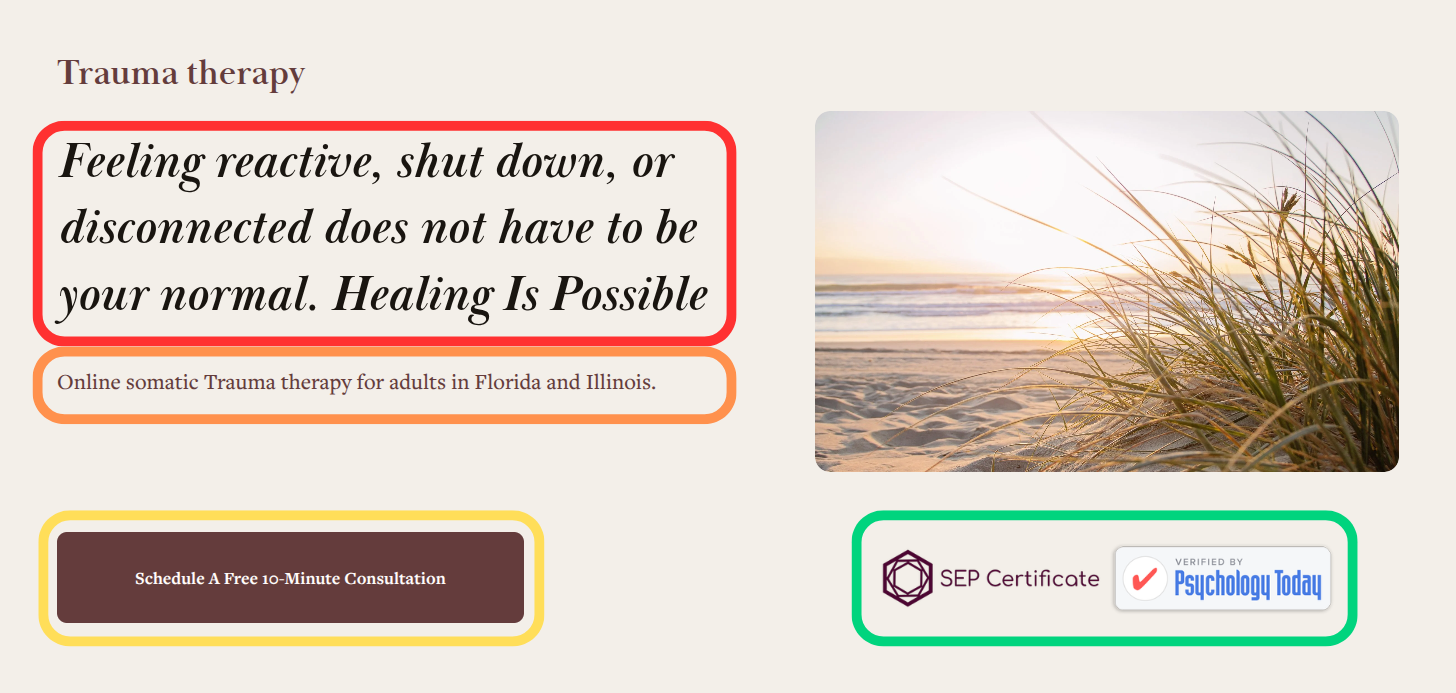
Adapt the structure to your practice. Check your wording, offer and credentials before publishing.
See it in practice
Check the first scroll on a phone.
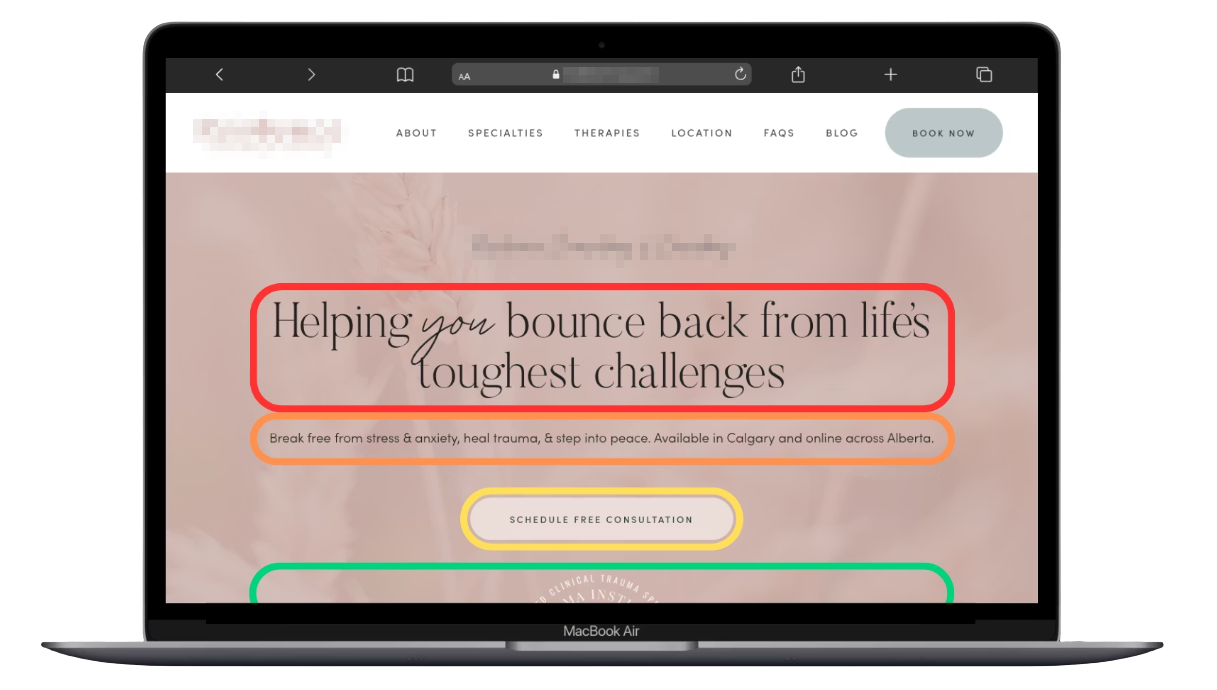
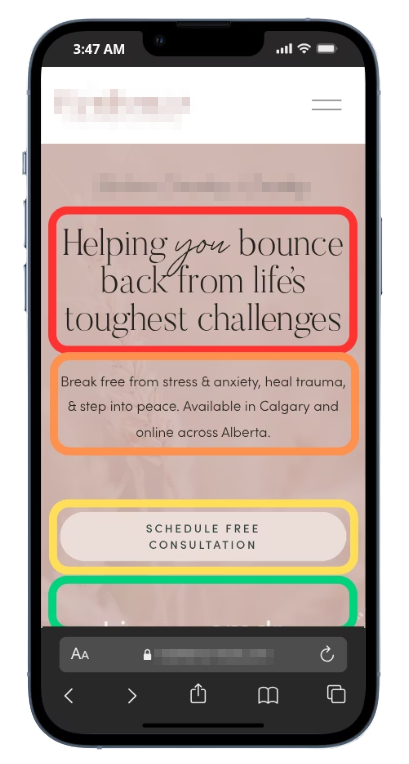
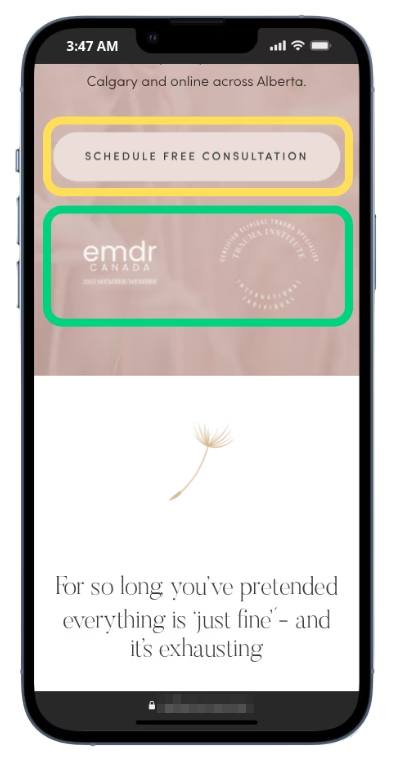
Keep the service and contact path easy to find. Test a real phone, larger text and keyboard access.
Website optimization
Use headings to explain the page.
A meaningful outline
Give the page a descriptive main heading, then organize sections beneath it.
- Use H2 for main sections and H3 for their subsections.
- Write headings that describe the content below.
Natural, useful copy
Explain the service in the language your audience understands.
- Cover relevant populations, approaches and questions.
- Choose heading levels for structure, then style them.
There is no required keyword position in the first two paragraphs, or special capitalization formula.
Website optimization
Show the real practice clearly.
Choose helpful images
Use authentic office and team photos when they help a visitor.
- Confirm permission and keep clients out of photos.
- Size and compress images for their displayed role.
Make the meaning accessible
Write concise alternative text for informative images.
- Describe meaningful content rather than stuffing keywords.
- Use empty alt text only for decorative images.
Image recognition does not replace accessible text. Original photography does not need to be exclusive to your domain.
02 · Build
Every page
has a purpose.
Help people move from a broad introduction to the details they need.
Homepage, service, location and FAQ pages each answer different questions.
Website optimization
Make your homepage a useful hub.
Orient the visitor
Introduce the practice, the help available and the people providing it.
- Explain who you serve and where.
- Offer a clear route to contacting you.
Point to the details
Let people explore without crowding the opening screen.
- Link to important services, locations and clinician bios.
- Make fees, FAQs and accessibility information findable.
Use your practice name and a useful description. The homepage does not need a rigid keyword-only heading.
Website optimization
Answer the questions about one service.
Explain the fit
Describe what the service involves and who you work with.
- Discuss your approach without outcome guarantees.
- Include relevant clinicians, formats and practical FAQs.
Connect the next steps
Help people find the service where they can actually receive it.
- Link to the relevant office or telehealth information.
- Explain the consultation and intake process.
A location word in a service URL is not inherently harmful. Choose a clear structure and avoid unnecessary URL changes.
Website optimization
Make each location page specific.
A real office
Help someone understand and reach that particular location.
- Include accurate address, access and arrival details.
- List the clinicians and services available there.
A clear service area
Describe where you can provide care and in which format.
- Separate telehealth coverage from physical offices.
- Use relevant local details, not copied city-name pages.
A map can help visitors reach an actual office. A URL folder or map embed does not guarantee ranking.
Remove uncertainty before contact
Answer the practical questions.
Publish clear answers your team can keep accurate.
- 01
Fees
What will it cost?
Explain fees, accepted insurance and relevant payment arrangements.
- 02
Access
How do I get started?
Describe scheduling, availability and the first contact.
- 03
Format
Where does therapy happen?
Explain office access, telehealth and geographic eligibility.
- 04
Expectations
What happens next?
Describe intake, confidentiality information and cancellation policies.
03 · Connect
One practice.
Consistent details.
Help people verify the same facts wherever they find you.
Start with eligibility and accuracy, then connect the information.
Website optimization
Make the profile match the practice.
Identity and services
Use the real-world business name and accurate available categories.
- Keep services aligned with what the website offers.
- Use profile features only when appropriate and available.
Location and contact
Use the actual operating address and correct website destination.
- Multiple eligible businesses can share an address.
- Use a real suite number only when it exists.
Do not invent categories, add a fake suite or duplicate services as products just to fill every field.
Website optimization
Online-only care needs a different path.
Telehealth-only practice
Google excludes online-only businesses from Business Profile eligibility.
- A hidden address does not change that rule.
- A friend’s address or virtual office is not a workaround.
Build relevant website visibility
Explain where you are licensed and how online care works.
- Create useful service and telehealth information.
- Keep appropriate professional directory profiles accurate.
A service-area business provides in-person services at customers’ locations. That is different from telehealth.
Website optimization
Describe the facts in structured data.
Start with verified information
Schema provides a machine-readable description of your public content.
- Use an appropriate type for the real organization or service.
- Keep names, URLs, locations and credentials accurate.
Keep one coherent implementation
Check what your website or plugin already generates.
- Connect related entities and avoid conflicting duplicates.
- Never add ratings, offices or credentials you cannot verify.
Structured data is not a shortcut to Maps placement or an AI recommendation.
A practical schema workflow
Draft it. Check it. Validate it.
AI can help draft the markup; you own the facts.
- 01 · COLLECT
Provide the public details
Ask what information is needed for an appropriate schema type. Leave unknown details out.
- 02 · REVIEW
Check before installation
Review the type, entities and every value. Check your platform’s current integration instructions.
- 03 · VALIDATE
Inspect the published page
Use the Schema.org validator and, for supported Google features, the Rich Results Test.
A valid script can still describe the wrong facts. Compare it with the visible page.
Website optimization
Keep useful profiles accurate.
Choose relevant places
Focus on directories people actually use to find or verify a practice.
- Review professional and local business listings.
- Follow each platform’s eligibility requirements.
Maintain the facts
Use consistent identity, contact and service details.
- Correct duplicates and outdated office information.
- Keep profile links pointed at the relevant website page.
Directory presence can help discovery and verification. It does not ensure inclusion in an AI answer.
Website optimization
Earn attention with something useful.
A story worth sharing
Communicate a real contribution, event or practice development.
- Offer useful expertise to relevant publications.
- Make the source and any commercial relationship clear.
Understand distribution
A paid press release is different from independent reporting.
- Syndication is not hundreds of independent endorsements.
- Avoid paid links intended to manipulate search rankings.
Evaluate publicity for its actual audience and value. Do not buy it on a promise of rankings or AI visibility.
04 · Review
Keep a record of what changed.
Track one page or profile at a time.
- 01
Baseline
Save the current state.
Record the URL, page purpose and useful performance information.
- 02
Change
Write down the improvement.
Note the copy, structure, profile or technical change and its date.
- 03
Verify
Check the actual experience.
Test navigation, mobile layout, forms, redirects and published facts.
- 04
Review
Look for useful results.
Compare relevant traffic and inquiry quality over a suitable period.
Your next step
Let’s talk about
your practice.
Bring your questions to a free strategy call.