
Future Proof Your Practice
How to prove
you really exist.
The Credibility pillar:
your practice, your people, your proof.
Why credibility matters
Make the real practice easy to find.
A visitor has questions
Who is behind this website, and are they qualified to help?
- A clear practice identity
- A professional record they can check
Give people a direct route to the answer.
Your information connects
Your website, public profiles and credential records should tell a consistent story.
- Accurate names, locations and contact details
- Useful links to original sources
Build on sound search fundamentals.
Clear, useful information supports discovery. No single account, listing or identifier guarantees an AI recommendation.
Your presenter · Moonraker
I’m Scott Pope.
Helping therapy practices make sense of search, AI and growth.
At Moonraker, I work with the educators, consultants and partners who support therapists in private practice.
Make your practice and professional qualifications easy to recognize and check.

Practice example · Search Console clicks
Look at the evidence.
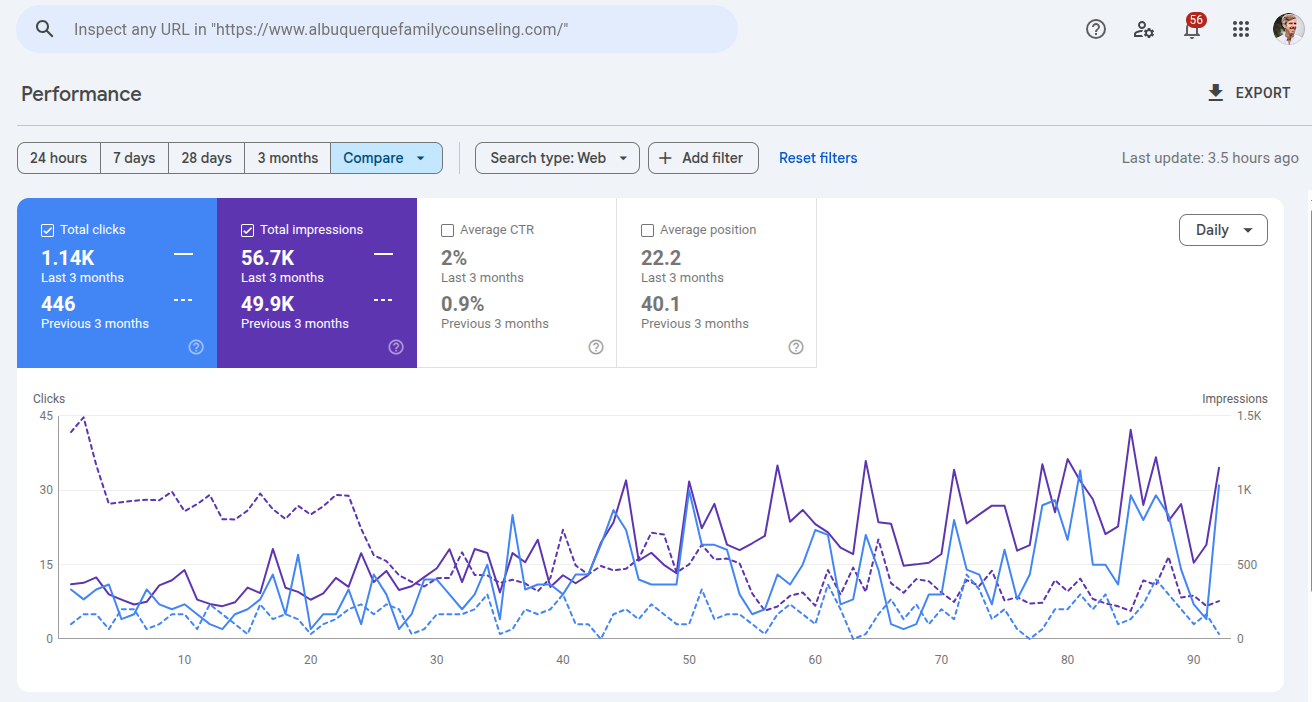
- Previous 3 months
- 446clicks
- Last 3 months
- 1.14Kclicks
Couples and family counseling practice. Exact comparison dates are not shown.
Practice example · Search Console clicks
EMDR, somatic therapy and intensives.
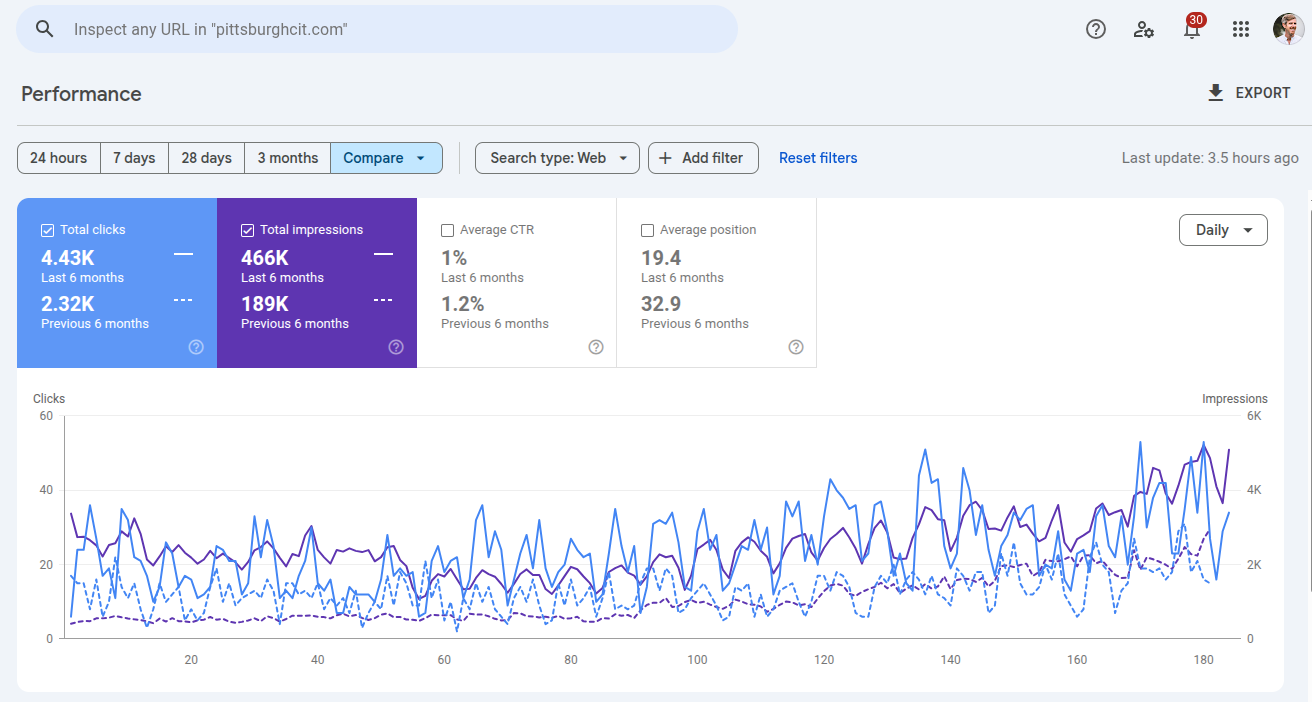
- Previous 6 months
- 2.32Kclicks
- Last 6 months
- 4.43Kclicks
EMDR, somatic therapy and multi-day intensives. Exact comparison dates are not shown.
Practice example · Search Console clicks
ADHD and autism assessments.
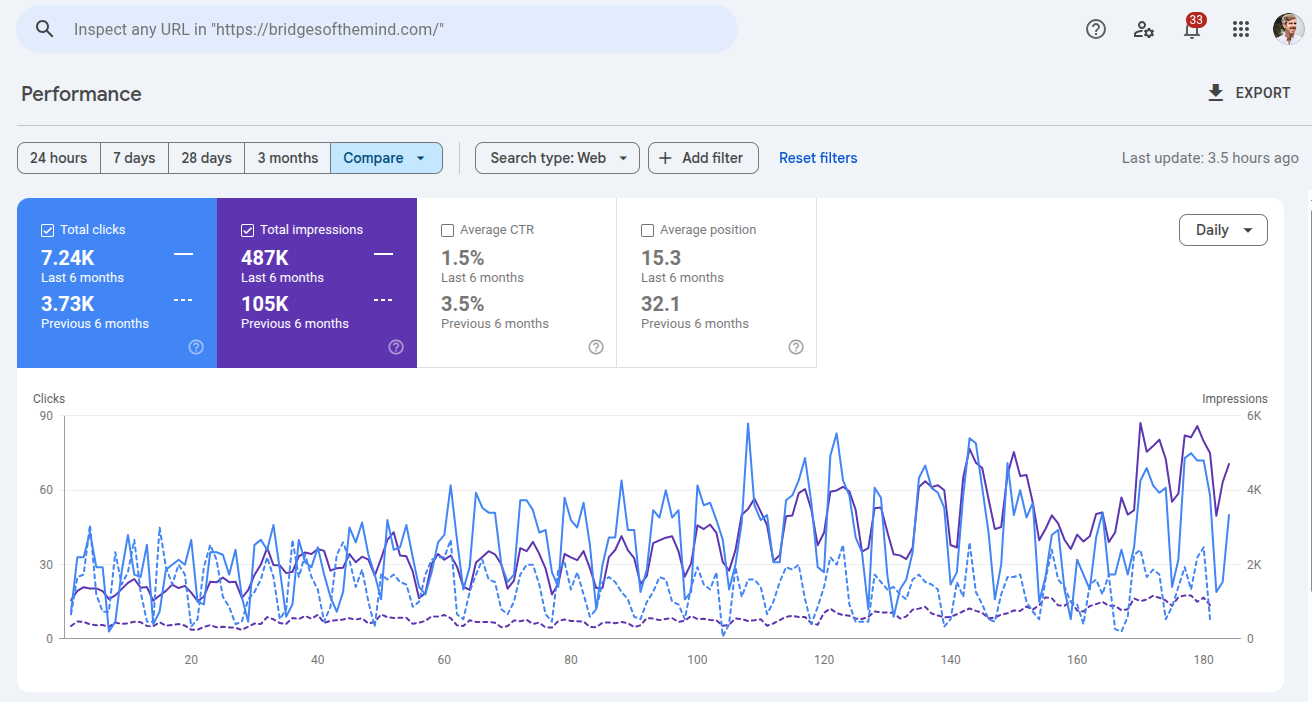
- Previous 6 months
- 3.73Kclicks
- Last 6 months
- 7.24Kclicks
Psychological assessments, including ADHD and autism testing. Exact comparison dates are not shown.
The CORE Marketing System™
Four pillars.
One clearer picture of your practice.
- C
Credibility
Do you exist, and are you qualified?
- O
Optimization
What do you treat, how, and where?
- R
Reputation
What supports your expertise?
- E
Engagement
How can someone connect with you?
01 · Credibility
Make your practice
easy to check.
Connect the practice people find online with the people and services behind it.
Two foundations: a recognizable practice and verifiable professional qualifications.
The two sides of credibility
A real practice. A qualified professional.
Your practice exists
Make your business information accurate and easy to recognize.
- Your domain and professional contact details
- Relevant listings and connected profiles
One consistent practice identity.
You can provide the service
Make your professional background specific and verifiable.
- Licensing, education and relevant training
- Memberships and original public work
A clear record of your qualifications.
Practice identity · Business email
Start with your own domain.
A recognizable address
Use your practice domain for professional communication.
- For example: hello@yourpractice.com
- Keep the same domain on your website and profiles
Choose an address your team checks regularly.
A managed email service
Google Workspace is one option. Choose a service that fits your practice.
- Keep administrative access under practice control
- Ask your administrator to check authentication
Paying for email does not prove an AI ranking advantage.
Practice identity · Email authentication
Three checks behind your email.
Give receiving mail services a way to check messages sent using your domain.
- SPF
Who can send?
Names the services authorized to send mail for your domain.
- DKIM
Is it signed?
Adds a signature that receiving services can validate.
- DMARC
Does it align?
Checks alignment with the From domain and publishes a policy and reporting settings.
These are email authentication controls. They do not certify clinical qualifications.
Email setup · Your administrator’s task
Use the settings for your setup.
SPF: inventory your senders
List every service that sends mail using this domain before changing its DNS records.
- Include your email provider and other authorized senders
- Maintain one SPF record with the needed mechanisms
A Google-only example is not a complete recipe for every practice.
DKIM: use your own key
Follow your provider’s instructions to generate and publish the public key for your domain.
- Use the supplied selector and TXT value
- Enable signing and verify a received message
Copy values from your provider, not from a sample slide.
Email setup · DMARC
Check delivery before tightening policy.
Monitor first
Ask your administrator to review authentication and DMARC reports for every legitimate sender.
- A p=none policy requests monitoring
- Use a working reporting destination
Monitoring alone does not ask receivers to block failing mail.
Strengthen carefully
Resolve legitimate sending failures before moving to quarantine or reject.
- Check messages from each sending service
- Review reports after each policy change
Follow your provider’s current rollout guidance.
Practice identity · Directory listings
Keep one accurate set of details.
Start with the real business
Use the name, phone number and location or service area that accurately describe your practice.
- Keep your website and main listings current
- Correct old addresses and disconnected phone numbers
Resolve factual conflicts and duplicate listings.
Follow each platform’s rules
Only create listings your practice is eligible to use.
- Google Business Profile, Bing Places, Apple Maps and Yelp
- Check location and service-area requirements
An online-only practice is not automatically eligible for Google Business Profile.
Aim for consistent facts and clear identity. Formatting differences are not evidence that a practice is fake.
Practice identity · Relevant coverage
Choose listings that fit your practice.
Therapy and specialty directories
Focus on directories that fit your services, audience and eligibility.
- Examples: Psychology Today, TherapyDen or GoodTherapy
- Relevant training, association or insurer directories
Check current terms, cost and profile accuracy before joining.
Distribution and maintenance
A listing service may distribute business data to other platforms.
- Ask which destinations it actually covers
- Check live records and how corrections are handled
There is no universal five-provider submission requirement.
Maintain useful records over time. A longer account list does not by itself establish expertise.
Practice identity · Connected profiles
Make your profiles point back to you.
Your website is the hub
Link to the professional channels your practice actually maintains.
- Relevant business, professional and social profiles
- A useful video channel or Quora Space, if you use one
Keep names, descriptions and website links current.
Use the available connections
Add your website to those profiles and supported social links to an eligible Business Profile.
- Google supports one link per supported platform
- Availability can vary by region and profile
No need to create nine accounts just to fill a checklist.
Practice identity · Real-world details
Make your location useful to people.
An office people visit
Keep the address, map location and arrival information accurate wherever they appear.
- Check the entrance and map pin
- Explain useful arrival or accessibility details
Only publish locations your practice actually uses.
Remote or service-area work
Explain how and where you provide services, including the areas you are licensed to serve.
- Distinguish online appointments from office visits
- Follow listing eligibility and address-display rules
Make the service clear without inventing a physical office.
Optional tools · Start with a real need
Know what the extra tools do.
These tools have specific uses. They are not required steps for appearing in Google’s AI search features.
- DID
A digital identifier
A decentralized identifier can support identity systems and cryptographic verification.
- KML
A geographic file
Describes geographic features for tools such as Google Earth.
- Plus Code
A location code
Identifies a geographic area and can help communicate a place.
Use a specialist when a project needs these tools. An identifier or map file does not prove someone is qualified to practice.
Credibility · Professional qualifications
Show what
qualifies you.
Make your professional history specific, current and easy to check.
Connect your bio to licensing records, relevant training and the work you have contributed to your field.
Professional qualifications · Public records
Give each credential the right context.
Your license
Name your licensing jurisdiction and professional credential clearly on your bio.
- Include the relevant license information
- Link to the official verification record or search
Test the link and keep your information current.
Your NPI, if applicable
Check that your National Provider Identifier entry has accurate public practice information.
- Link to your own NPI Registry record
- Use the licensing board to verify licensure
CMS states that an NPI does not validate licensing or credentials.
Prefer useful public verification links. A photograph of a diploma or license is optional and should omit private details.
Professional qualifications · Education
Tell the full story of your training.
Degrees and institutions
Spell out the qualification and name the institution where you earned it.
- For example: Master of Social Work
- Add relevant completion dates and institution links
An institution’s homepage gives context; it does not verify an individual degree.
Specialist training
Describe the training level or certification you actually hold.
- Distinguish completing training from being certified
- Link to an individual directory record where available
Examples may include EMDRIA or IFS Institute records.
Professional qualifications · Associations
Show where you participate.
Relevant associations
Name the professional organizations you currently belong to.
- For example: APA, NASW or AAMFT
- Relevant specialty and state associations
Only include memberships and roles you actually hold.
A useful link
Link to your member profile when a public directory record is available.
- Check that the profile belongs to you
- Keep the membership and website details current
Do not imply that a general association link verifies membership.
Professional qualifications · Contributions
Let people explore your public work.
Published contributions
Show the original work you have written or helped create.
- Articles, books and co-authored publications
- Guest contributions relevant to your expertise
Credit your role and link to the original source.
Speaking and media
Give visitors a way to find the conversations and events you contributed to.
- Podcast interviews and news appearances
- Conferences, teaching and professional events
Describe the contribution accurately, without implying an endorsement.
Your bio page · One useful destination
Your bio connects the evidence.
- 01
Introduce the person.
Show your photo, approach and who you help.
- 02
Link the credentials.
Link to licensing, education and training records.
- 03
Show the contribution.
Credit memberships, publications and endorsements.
- 04
Make contact clear.
Give visitors a clear way to reach your practice.
Your approach.
License · Education · Training
Links to public verification
Your professional story
Publications and contributions
A clear way to connect
Your bio page · Structure and upkeep
Make the record easy to understand.
Useful visible information
Keep the important details in readable page text, with descriptive headings and links.
- Explain your clinical approach in plain language
- Check credentials and links as details change
A quarterly review is a useful maintenance habit.
Matching structured data
Ask your web team to describe the page accurately using appropriate schema.org types.
- Person for the person; ProfilePage where appropriate
- Match the facts and links visible on the page
Validate the markup. It does not independently verify a credential.
Your credibility checklist · Practice identity
Check the practice people find.
Work through the details that connect your website to your practice.
- 01
Domain and email
Confirm the foundations.
Check your domain, managed email and sending authentication with your administrator.
- 02
Listings
Correct the facts.
Review your main eligible listings for accurate names, phone numbers and locations.
- 03
Connected profiles
Check the links.
Connect the channels you maintain and remove outdated or incorrect links.
- 04
Location
Make services clear.
Explain office visits, remote services and the areas you serve accurately.
Your credibility checklist · Qualifications
Check the professional record.
Make your bio a useful route to accurate, verifiable information.
- 01
Licensing and NPI
Verify your records.
Check the official license link and your public NPI record, if applicable.
- 02
Education and training
Be specific.
Name your degrees and actual training level, with individual verification links where available.
- 03
Professional work
Credit the originals.
Link to current memberships, publications and the events you contributed to.
- 04
Your bio
Bring it together.
Keep the page readable, update its links and check that any markup matches the visible facts.
Your next step
Let’s talk about
your practice.
Bring your questions to a free strategy call.