
Future Proof Your Practice
How to thrive
in the AI era.
A practical introduction to the
CORE Marketing System™.
Why this matters for your practice
The way people find help
is changing.
People can discover practices through search, map listings and AI-assisted answers.
“Who offers EMDR
therapy near me?”
Be clear.
Be easy to verify.
Use CORE to strengthen the information people find and the experience they have next.
Why AI visibility matters
AI search is already
part of everyday life.
2.5B+
AI Overviews users
Monthly, worldwide
Reported 3 June 2026
Google investor presentation ↗1B+
AI Mode users
Monthly active users, worldwide
Reported 22 July 2026
Alphabet Q2 earnings remarks ↗Give people clear, verifiable information about your practice in the places they search.
Google-reported figures. Audiences overlap; these are global product-user counts, not therapy-search volumes.
Your presenter · Moonraker
I’m Scott Pope.
Helping therapy practices make sense of search, AI and growth.
At Moonraker, I work with the educators, consultants and partners who support therapists in private practice.
A practical way to review your online presence, one CORE pillar at a time.

Practice example · Search Console clicks
Look at the evidence.
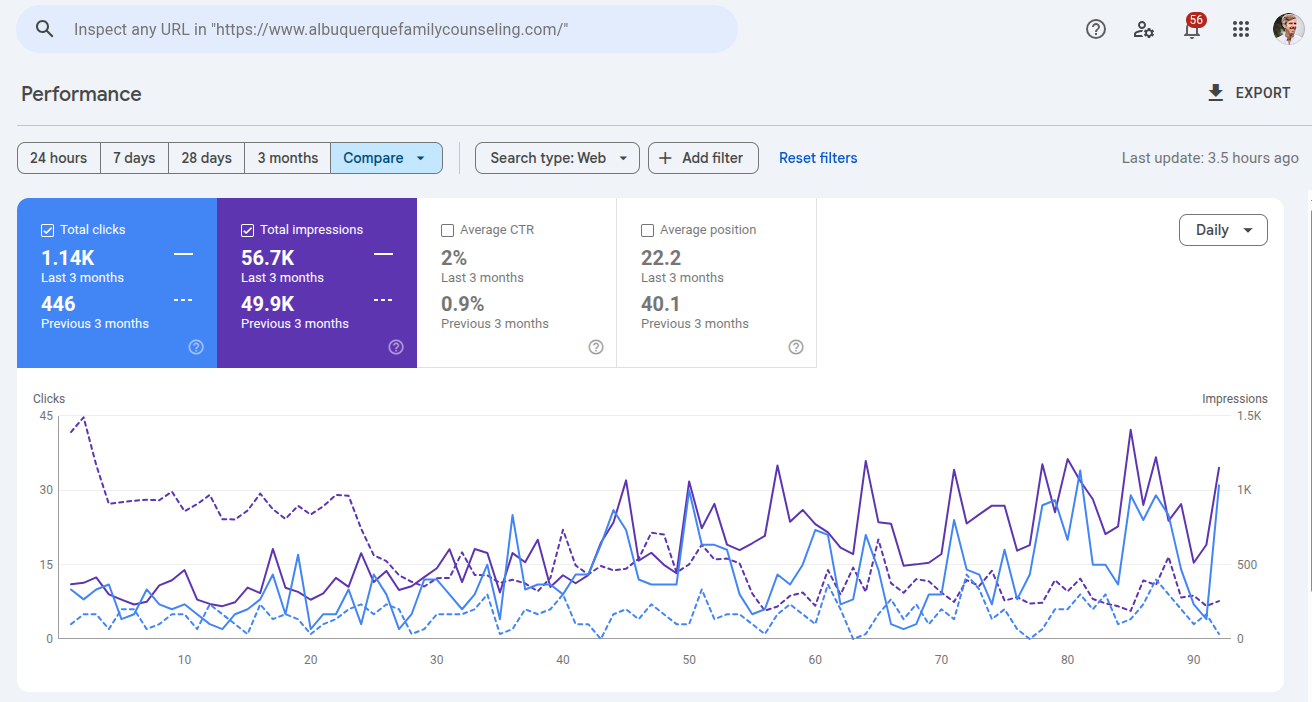
- Previous 3 months
- 446clicks
- Last 3 months
- 1.14Kclicks
Couples and family counseling practice. Exact comparison dates are not shown.
Practice example · Search Console clicks
EMDR, somatic therapy and intensives.
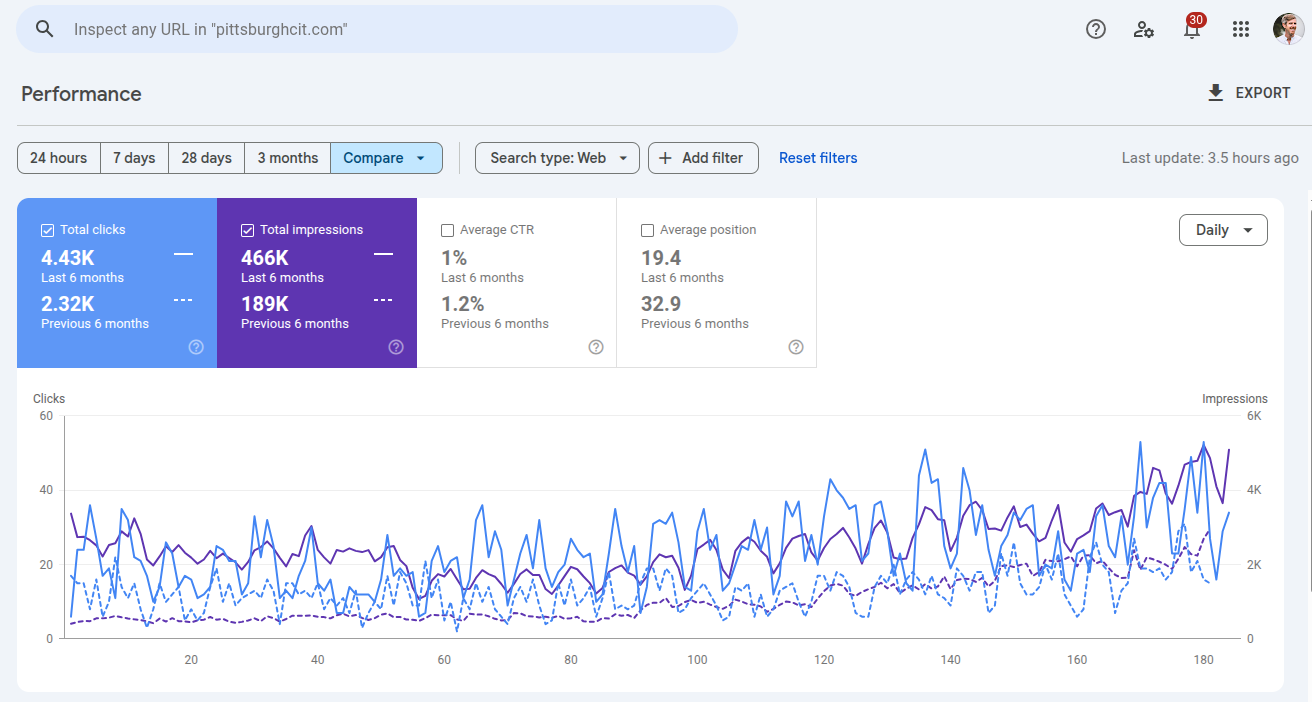
- Previous 6 months
- 2.32Kclicks
- Last 6 months
- 4.43Kclicks
EMDR, somatic therapy and multi-day intensives. Exact comparison dates are not shown.
Practice example · Search Console clicks
ADHD and autism assessments.
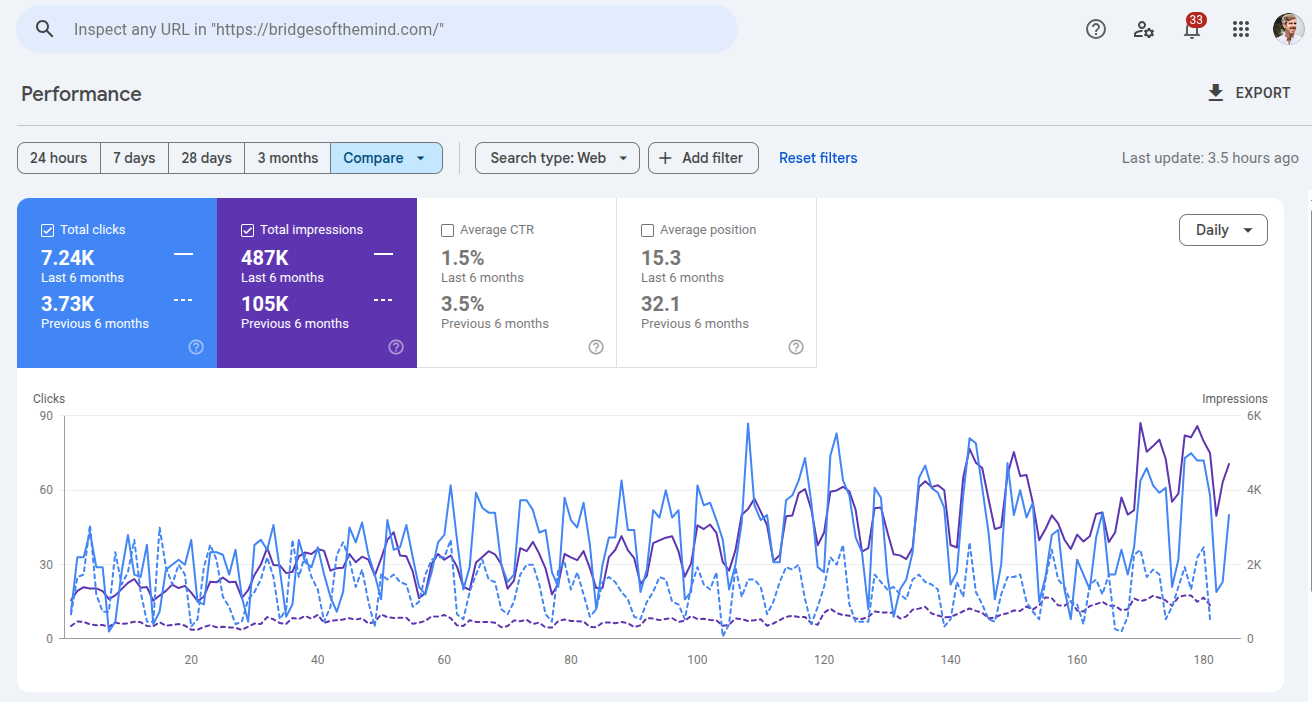
- Previous 6 months
- 3.73Kclicks
- Last 6 months
- 7.24Kclicks
Psychological assessments, including ADHD and autism testing. Exact comparison dates are not shown.
The CORE Marketing System™
Four pillars.
One clearer picture of your practice.
- C
Credibility
Do you exist, and are you qualified?
- O
Optimization
What do you treat, how, and where?
- R
Reputation
What supports your expertise?
- E
Engagement
How can someone connect with you?
01 · Credibility
Make your practice
easy to verify.
Help people understand who you are, where you work, and what qualifies you to help.
Start with the foundations: your practice information, professional credentials, and consistent details across the web.
01 · Credibility
Make your practice easy to recognize.
Consistent practice details
Keep your name, address or service area, and phone number accurate across your website and relevant directories.
- Google Business Profile
- Apple Maps, Bing Places and other relevant listings
Correct outdated details and link back to your website.
Connected profiles
Help visitors find the professional profiles you actually use, and recognize that they belong to the same practice.
- Link from your website to your profiles
- Keep profile information and website links current
Choose channels you can maintain.
01 · Credibility
Put your domain to work.
Business email
Use an email address on your practice domain for professional communication.
- Google Workspace is one option
- Choose a provider that fits your practice
A paid account supports operations; it does not prove an AI ranking advantage.
Email authentication
Ask your email or domain administrator to check the records that authenticate your outgoing mail.
- SPF: authorized sending services
- DKIM: signed messages
- DMARC: alignment, policy and reporting
These controls support email authenticity and delivery.
01 · Credibility
Make qualifications easy to check.
Professional credentials
Make your licensing information easy to find on your bio page.
- Name your licensing state and credentials
- Link to the public license-verification record
Keep links and information up to date.
Education and training
Describe the education and specialist training that informs your work.
- Identify degrees and institutions
- Name relevant certifications and training programs
Link to verifiable records where available.
01 · Credibility
Show your professional involvement.
Professional associations
List current memberships that are relevant to your work.
- For example: APA, NASW or AAMFT
- Link to your member profile where available
Be precise about your role and membership status.
Your public work
Give visitors a way to explore your contribution to the field.
- Articles, interviews and podcast appearances
- Teaching, speaking and media features
Link to the original publication or event.
02 · Optimization
Explain what
you do.
Make it clear what you treat, how you help, and where you provide services.
Give each important service a useful page, then organize the information around real visitor questions.
02 · Optimization
Make it clear what you do
and where you do it.
Service pages
Give each key specialty or modality its own page. Explain who it helps and what to expect.
Location pages
Say where you provide services and where you are licensed to work.
Help visitors see whether you can support them.
Teach AI about your services · 1 of 2
02 · Optimization
Make the information
easy to understand.
Clear page structure
Use descriptive titles, headings and links. Make each page’s topic easy to understand.
- Page topic
- Clear headings
- Useful details
Ask your web team to check clean HTML and structured data that matches the visible content.
Useful answers
Answer real questions about each service in your own words.
What happens in a first session?
YOUR PAGE ANSWERSA clear explanation in your own words.
Use recurring enquiries and relevant search questions as prompts. There is no required FAQ count.
Teach AI about your services · 2 of 2
03 · Reputation
Let your expertise
speak.
Make your experience visible through specific, verifiable professional contributions.
Bring together authentic colleague perspectives, useful publications and the expertise you share in public.
03 · Reputation
Make professional support specific.
Firsthand professional knowledge
A colleague can describe the work or expertise they know directly.
- Relevant supervisors, peers, educators or referral partners
- Specific knowledge of your specialty or approach
Use genuine statements, with no promised endorsement in return.
Clear attribution
Give readers enough context to understand who is speaking and how they know your work.
- Name, credentials and professional relationship
- An approved photo and relevant professional links
Get permission and follow your profession’s rules.
Keep professional endorsements separate from patient reviews. Do not recruit colleagues to manufacture Google reviews.
03 · Reputation
Share expertise where people look.
Business and social profiles
Share useful practice updates, credentials and approved professional information on the channels you maintain.
- Keep your Google Business Profile current
- Use relevant social channels consistently
Examples: Facebook, LinkedIn, Instagram, TikTok, Pinterest and X.
Useful video
Use a short video or slideshow to answer one service question or explain your approach.
- Make the explanation useful on its own
- Link to the relevant page on your website
Choose YouTube when video suits your audience and workflow.
03 · Reputation
Build a useful public record.
Answer real questions
Contribute your expertise to relevant public discussions, including a Quora Space if it serves your audience.
- Be clear about your professional background
- Write an original, useful answer
Respect the community’s rules and people’s privacy.
Share meaningful news
Use articles, interviews or a press release when you have something useful to share.
- A publication, event or substantive practice update
- Accurate claims and links to original information
Syndication alone does not establish independent validation.
04 · Engagement
Make the next
step clear.
Help a visitor understand how to connect with your practice, on any device.
Use the opening of your homepage and service pages to explain the benefit, the service, and the next action.
04 · Engagement
Give visitors a clear next step.
- 01
Lead with the“why”
Describe the outcome someone is seeking.
- 02
Explain the“what”
Say clearly what service you provide.
- 03
Make theaction obvious
Give the consultation button a clear place.
- 04
Supporttrust
Include relevant credentials and evidence.
Explain how your service can help.
Credentials · Experience
Your next steps
Choose one useful change.
Start with one important page, then build from there.
- C
Credibility
Verify the basics.
Check your contact details, professional credentials and links to the profiles you use.
- O
Optimization
Fill one useful gap.
Improve an important service or location page. Answer the questions visitors actually ask.
- R
Reputation
Show real expertise.
Add a verifiable professional contribution or a specific, permission-based colleague endorsement.
- E
Engagement
Make contact easy.
Check the consultation action on your homepage and service pages, on desktop and phone.
Your next step
Let’s talk about
your practice.
Bring your questions to a free strategy call.